
Imagine spending +40 hours coding a game only for players to absolutely hate it! 🤦♀️
Scenario: You're designing your first digital escape room game. You ask your friends to playtest, and you notice them getting stuck on a puzzle. You spend 40 hours coding custom auto-hint pop-ups. But when escape room fans play your game, they...hate it!
What went wrong? You jumped straight to coding a huge feature without finding the real problem. Did escape room fans hate your game because it was way too easy for them, or was it something else?  Applying design thinking helps you beyond avoiding wasted time and effort. You get to understand your player, define root causes, ideate and prototype low-cost fixes, and test single variables to build games players love.
Let’s practice these steps together!
1. Understand The Game and The Player
Before tweaking code or art, you must immerse yourself in the genre's mechanics and understand the people who play it.

Know the Genre
Play 3–5 games in your target genre (top-rated, innovative, and poorly rated) to:
Learn established rules
e.g., in escape rooms: inventory management, visual cues, lock logic
Identify mechanics (the actions players will do)
e.g., in escape rooms: inspecting props, combining items, solving combination locks, or managing inventory

Define the Target Player
Testing a puzzle game on someone who only plays racing games will give you misleading feedback.
What do players want from this genre?
e.g., puzzle players want logic, action players want fast reflexes and high speed
How long will players struggle before quitting?
e.g., puzzle fans will inspect clues for minutes, arcade fans expect instant action

Observe Playtesters
Never offer hints. If asked, "Where do I go?" respond, "What do you think you should do?"
Watch body language. Leaning forward signals engagement; sighing or frantic clicking signals friction and confusion.
Record exact actions with their timestamps, not general opinions
Timestamps log example:
Observation 1 (Min 0:45): Player clicks a decorative clock 8 times. (Clock details look like an interactive clue).
Observation 2 (Min 2:10): Player stares at a locked chest with 3 keys in inventory. (Lacks visual feedback on key fitting).
Observation 3 (Min 4:30): Player matches a calendar date to a combination lock and smiles. (Logic worked.)
Quiz 1 ❓
You're watching a playtester try a sneaky game level. After crouching behind a barrel for 2 minutes, they get spotted by a guard, sigh loudly, and ask: "Where am I supposed to hide?"
What is the correct way to log this and respond?
 A. Tell them "Try hiding behind the stone wall," and write in your notes: "Player doesn't understand stealth mechanics."
B. Say "What do you think you should do?" and write in your notes: "Min 2:10 - Player crouches behind barrel for 120s, spotted by guard."
C. Explain how guard vision cones work so they don't get frustrated and quit the playtest.
D. Stop the playtest immediately to edit the guard's sight distance in your game engine code.
Quiz
What is the correct way to log this and respond?
2. Define The Root Cause
 Next, you should filter your messy observation notes down to one primary problem.
Eliminate Observations
Frequency & severity: Does the problem stop most players? 📍
Eliminate observation 3 since it is a win, not a problem.
Keep observation 2 since it caused slight confusion.
Keep observation 1 since it blocked 80% of test players in Minute 1.
Root cause vs. symptom: Is this a real roadblock or isn't the mechanic clear? 📍
Keep observation 1, as players failed because high-contrast lighting tricks them into searching for a fake clue.
Keep observation 2, as players failed because identical key graphics provided unclear feedback.
Enjoyability: Where does it ruin the fun? 📍
Select observation 1 as the primary problem, as it immediately breaks the fun at minute 0:45, causing players to drop off early.
Log observation 2 into your problem backlog to work on it next.

Find the Root Cause by Asking Why
Player complaint: "I got stuck immediately searching this room and clicked the clock over and over."
Why? I thought the clock hands were a puzzle clue.
Why? The clock had high-contrast metallic details and sat under a bright spotlight.
Why? The background decor used the same high visual contrast and lighting as the active clues. (root cause)

Write an Actionable Problem Statement
Don't include preset solutions"
"needs a pop-up warning" locks you into one feature ❌
"needs a way to distinguish clues" leaves room for visual, lighting, or spatial fixes ✅
Use this template: target player needs a way to [goal] because [root cause]
"Escape room fans need a way to tell apart active clues from background decor (clock), because decor uses the same high visual contrast and lighting as the active clues."
Quiz 2 ❓
In a platformer game, 90% of play testers miss a crucial jump over a pit and quit. They complain: "The jump button delay is terrible!" You check your engine code and see inputs register instantly, but the cliff edge is painted dark blue against a black background.
What is the true root cause?
 A. Playtesters lack the physical reaction speed needed for platforming games.
B. You need to rewrite the jump input code to give players extra air time.
C. Low visual contrast between the cliff edge and the background hides the true jump point from players.
D. The pit gap is too wide, so you must shorten the distance between platforms by 50%.
Quiz
What is the true root cause?
3. Ideate Low-Cost Solutions
 Categorize the root cause to focus your on brainstorming quick edits within that category, rather than writing complex software scripts.
Categorize Your Root Cause
This will help you know where to focus your ideas:
Graphics/Visual affordances: lighting, contrast, subtle visual cues
Game flow/Pacing: room layouts, puzzle sequencing
Mechanics: inventory controls, player actions
In our scenario, the issue is graphics/affordance — visual cues that signal how an object works. Lighting and contrast are misleading the players.
Brainstorm Solutions
Work within the root cause's category, prioritizing low-effort visual fixes over heavy code.
High code: Write a script where the player's character says, "That clock looks useless," after 3 wrong clicks.
Annoying, interrupts immersion, and requires audio/dialogue code ❌
Medium art: Redesign the 3D clock model from scratch to look broken and dusty.
Works, but wastes hours remodeling background art. ⚠️
Low design (winner): Turn off the spotlight above the clock, desaturate its colors by 30%, and move the bright lamp over the actual clue desk.
Solves the issue instantly through basic lighting adjustments — zero code required! ✅
Quiz 3 ❓
In a dungeon runner game, play testers keep walking past a critical health potion because they think it is just a decorative floor bottle.
Which fix should you test first?
 A. Program a script where the player character speaks out loud: "I should pick up that health potion!" whenever they get close.
B. Spend 8 hours 3D-modeling an animated, glowing pedestal beneath every potion bottle in the game.
C. Turn on a small flickering spotlight over the potion bottle and increase its color saturation so it stands out from the floor.
D. Write a 2-page in-game tutorial pop-up explaining potion mechanics during room load screens.
Quiz
Which fix should you test first?
4. Prototype
Designing high-resolution 3D models before validating game logic locks you into bad ideas. If players get confused by your room layout on an index card, polished graphics won't save the game.
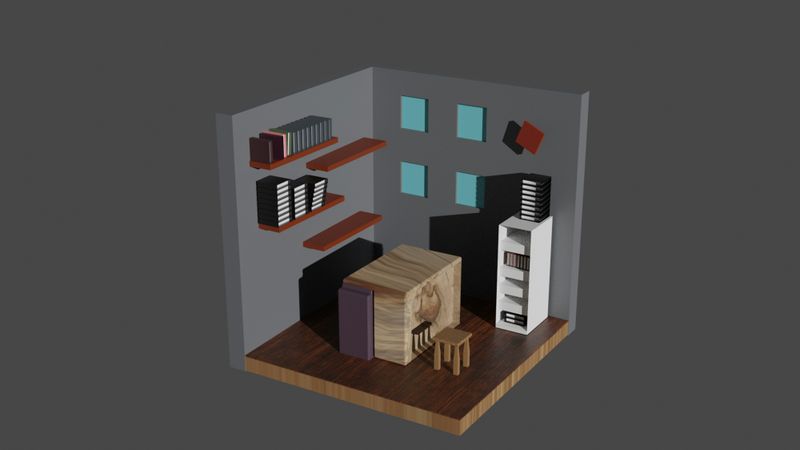 Photo by Emmanuel Edward on Unsplash
Pick the Right Prototyping Method
Visuals & affordances: Use sticky notes over a paper sketch to instantly swap out lighting or visual cues.
System mechanics: Use dice, coins, or tokens to test game balance and drop rates before writing logic scripts.
Interaction & UI (user interface): Use index cards to simulate inventory pop-ups and dialogue choices.
Build Your Paper Prototype
Sketch the base layout. Draw the room walls, dim clock, and brightly lit clue desk on paper.
Create input/output cards. Write inventory items (calendar notes, lock combinations) and lighting states on index cards or sticky notes.
Run a test. Ask a target player to "click" by pointing their finger at your paper sketch. You act as the game engine, handing them index cards or swapping sticky notes based on where they point.
Use a validation rule. If your tester still points to the dimmed clock, peel off the clock spotlight sticky note and shade it darker in 10 seconds — not 10 hours in game engine software.
Quiz 4 ❓
You're paper-prototyping a puzzle layout for a sci-fi door lock. The play tester points their finger at your pencil drawing of a decorative wall pipe, completely ignoring the main control panel.
What should you do?
 A. Stop the paper session, open your 3D game engine, and start modeling the sci-fi door digitally.
B. Take an eraser or pencil, cross out the wall pipe drawing on paper within 10 seconds, and ask the player to point again.
C. Tell the tester that wall pipes are non-interactive background decorations.
D. Throw away the drawing and spend the next hour sketching a brand-new level from scratch.
Quiz
What should you do?
5. Test & Improve
Change one design variable at a time to measure its exact impact.
 If you adjust clock lighting, key shapes, and puzzle code all at once between playtests, you won't know which change actually fixed player confusion.
Test One Change at a Time (A/B Testing)
Compare two test runs by changing only one detail at a time while keeping the rest of the game the same:
Test Run 1 (Dull the Colors): Make the clock colors 30% duller so it grabs less attention. Track how long players stare at or click the clock.
Test Run 2 (Move the Spotlight): Keep the clock colors dull, but move the room's lamp directly over the actual clue desk. Compare how much time players spend on the clock versus Test Run 1 to see if the light guides their focus to the right spot.
The Playtest Funnel Target
Track player progress through your core loop until you hit your 80% success benchmark:
Milestone 1: Room Entry (Target: 100% of players)
Observe players in complete silence. Never answer questions or offer hints when players look around.
Milestone 2: Ignore Fake Clues (Target: 80% completion rate)
If players spend over 30 seconds inspecting the decorative clock, stop the session and isolate a visual variable (e.g., dim the spotlight further) for the next run.
Milestone 3: "Aha!" Moment on Calendar Lock (Target: 80% completion rate)
Keep testing single variables until 8 out of 10 test players ignore the clock entirely and solve the core puzzle naturally.
Quiz 5 ❓
You want to see if adding a blinking yellow light above a dungeon exit helps lost playtesters find the door.
How should you set up your next test run?
 A. Add the blinking yellow light, change the player's movement speed, and add 3 new enemy guards all in the same test run.
B. Add the blinking yellow light only, keep all other room elements identical, and measure if players find the exit faster.
C. Send playtesters a written survey asking what color light they prefer in sci-fi games.
D. Remove all lights from the dungeon entirely to see if players can navigate using ambient sound effects instead.
Quiz
How should you set up your next test run?
Take Action
 Practice design thinking when you build your next game:
Your feedback matters to us.
This Byte helped me better understand the topic.